这是Greg Wilson在500lines上的文章。翻译水平有限,仅供参考。
介绍
Web在过去的20年里大幅的改变了社会,但它的核心却改变的非常少。大多数系统仍遵循着Tim Berners-Lee 25年前制定的规则。特别的,大多数web服务器仍以和以前一样的方式处理同类的消息。
本章将探索它们的实现方式。同时将探索开发者如何创建不需重写就可以添加新特性的软件系统。
后台
几乎Web上的每个程序都运行在被称为因特网协议(IP)的通信标准的家族上。家族的每个成员使用传输控制协议(TCP/IP),使计算机间的交流看起来像读写文件。
程序通过socket使用IP交流。每个socket是点对点交流通道的一端,就像手机是移动通信的终端。一个Socket由机器的IP地址和端口号组成。IP地址由4个8bit数字组成,例如174.136.14.108;域名系统(DNS)将这些数字匹配到像aosabook.org这样非常适合人类记忆的名字。
端口号是0-65355的数字,是主机上socket的独有标识。(如果把IP地址比作公司的电话号码,那么端口号就是电话分机。) 端口0-1023被操作系统使用;任何程序都可以使用其余端口。
超文本传输协议(HTTP)描述了程序在IP间交换数据的方式。HTTP有意简化为:客户端发送请求指定它想到达的socket连接,然后服务器发送一些数据作为回应。数据可以被从磁盘文件拷贝,由程序动态生成,或两者兼而有之。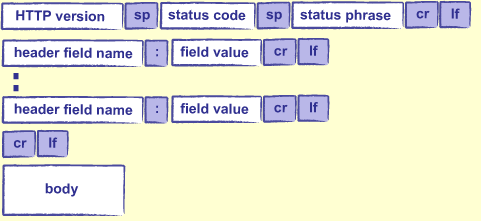
版本,标题和正文具有相同的形式和意义。状态码是一串数字,它指出在请求提交的过程中发送了什么:200意味着“一切工作正常”,404意味着“没有找到页面”,其它代码有着其它意思。状态语句将信息重复为人类可以理解的语句,如”OK”或”not found”。
本章的目的只有两个,我们需要了解HTTP其他事情。
首先它是无状态的:每个请求由程序自身解决,服务器不记得一个请求和下一个请求之间的任何事。如果应用程序想跟踪一些信息,例如用户身份,它必须自行完成。
通常的方式是使用cookie——一种由服务器发送给客户端,再由客户端稍后返回给服务器的短字符。当用户执行一些需要状态被跨数个请求保存的动作时,服务器创建一个新的cookie,存到数据库中,再把它发送给浏览器。每当浏览器返回cookie,服务器用它来查找用户正在用的信息。
我们需要了解的关于HTTP的第二件事是URL能补充参数,来提供更多信息。例如,当我们使用搜索引擎时,我们必须指定搜索的关键词。我们能把它添加到URL中的路径,但我们必须做的是把参数添加到URL中。我们可以在URL中加入”?”,后面是由”&”分割的键值对”key=value”。例如,对于http://www.google.ca?q=Python这个URL,让google搜索和Python有关的页面:键是字母”q”,值是”Python”。http://www.google.ca/search?q=Python&client=Firefox是一个更长的查询URL,告诉了google我们在使用Firefox。我们可以加入我们想要的任何参数,但同样,由网站上运行的应用决定要关注哪些参数,以及如何解释它们。
当然,如果’?’和’&’是特殊字符,必须有一种方式来转义它们,就像必须有一种方式将双引号字符放入双引号包裹的字符串中。URL编码标准代表的特殊字符使用2位数代码加’%’,并以’+’字符代替空格。比如在google中搜索”grade = A+”(包含空格),我们需要使用http://www.google.ca/search?q=grade+%3D+A%2B这个URL。
打开socket,构建HTTP请求,并解析响应是乏味的,所以人们用库来完成大部分工作。Python提供这样的一个库,称为urllib2(因为它是一个更早的,被称为urllib的库的替代),但它也暴露了许多大多数人不想关注的管道。Requests库是urllib2更易使用的替代品。下面一个例子,你可以从AOSA book的网站上下载它:1
2
3
4
5import requests
response = requests.get('http://aosabook.org/en/500L/web-server/testpage.html')
print 'status code:', response.status_code
print 'content length:', response.headers['content-length']
print response.text
1 | status code: 200 |
request.get向服务器发送一个HTTP GET请求,并返回一个包含响应的对象。这个对象的status_code成员是响应的状态码;它的content_length成员是响应数据的字节数,text是真实数据(本例中是HTML页面)。
Hello, Web
我们现在准备写我们的第一个简单web服务器。基本思想很简单:
1.等待某人连接到我们的服务器并发送HTTP请求;
2.分析请求;
3.找出它请求的内容;
4.命中数据(或动态生成它);
5.将数据格式化为HTML;
6.将数据发送回去。
第1,2,6步对于不同应用是相同的,所以Python基础库有一个BaseHTTPServer模块为我们完成这些。我们只需关注步骤3-5,正如我们在下面的程序中所做的:1
2
3
4
5
6
7
8
9
10
11
12
13
14
15
16
17
18
19
20
21
22
23
24
25
26
27
28import BaseHTTPServer
class RequestHandler(BaseHTTPServer.BaseHTTPRequestHandler):
'''Handle HTTP requests by returning a fixed 'page'.'''
# Page to send back.
Page = '''\
<html>
<body>
<p>Hello, web!</p>
</body>
</html>
'''
# Handle a GET request.
def do_GET(self):
self.send_response(200)
self.send_header("Content-Type", "text/html")
self.send_header("Content-Length", str(len(self.Page)))
self.end_headers()
self.wfile.write(self.Page)
#----------------------------------------------------------------------
if __name__ == '__main__':
serverAddress = ('', 8080)
server = BaseHTTPServer.HTTPServer(serverAddress, RequestHandler)
server.serve_forever()
这个库的BaseHTTPRequestHandler类专注于分析收到的HTTP请求并决定它包含的method。如果method是GET,这个类调用名叫do_GET的方法。我们的类RequestHandler优先于这个method动态生成简单页面:文本被存储在类层次变量Page中,我们把它在发送200响应码之后发回给客户端,Content-Type头告诉客户端把我们的数据解释为HTML,并告知页的长度(end_headers方法调用插入空白行来把我们的头从页中分离)。
但RequestHandler仍不是全部:我们还需要最后三行才能让服务器开始运行。第一行将服务器地址定义为一个元组:空字符串意味着”运行在当前机器上”,8080是端口号。然后我们创建一个BaseHTTPServer.HTTPServer实例,它把地址和请求处理器类名作为参数,然后用它来持续运行服务器(一直运行直到我们按Control-C终止它)。
如果我们从命令行运行这个程序,它不显示任何信息:1
$ python server.py
在浏览器中打开http://localhost:8080,我们会在浏览器中看到:1
Hello, web!
在我们的shell中看到:1
2127.0.0.1 - - [24/Feb/2014 10:26:28] "GET / HTTP/1.1" 200 -
127.0.0.1 - - [24/Feb/2014 10:26:28] "GET /favicon.ico HTTP/1.1" 200 -
第一行是直截了当的:当我们不请求特定文件时,浏览器请求”/“(/是服务器提供服务的跟目录)。第二行由于我们的浏览器自动发送二次请求来获取/favicon.ico这个图片文件而出现,如果这个图片存在则会在浏览器标签页上显示一个图标。
显示值
让我们修改我们的web服务器,来显示HTTP请求中包含的一些值。(我们将在调试时经常用到它,所以我们可以先来做个练习。)为了保持代码整洁,我们把创建页面的代码分离出来:1
2
3
4
5
6
7
8
9
10
11
12
13class RequestHandler(BaseHTTPServer.BaseHTTPRequestHandler):
# ...page template...
def do_GET(self):
page = self.create_page()
self.send_page(page)
def create_page(self):
# ...fill in...
def send_page(self, page):
# ...fill in...
send_page比我们前面做的漂亮多了:1
2
3
4
5
6def send_page(self, page):
self.send_response(200)
self.send_header("Content-type", "text/html")
self.send_header("Content-Length", str(len(page)))
self.end_headers()
self.wfile.write(page)
我们要显示页面的模板仅仅是包含HTML表的字符串,HTML表中有一些格式占位符:1
2
3
4
5
6
7
8
9
10
11
12
13
14 Page = '''\
<html>
<body>
<table>
<tr> <td>Header</td> <td>Value</td> </tr>
<tr> <td>Date and time</td> <td>{date_time}</td> </tr>
<tr> <td>Client host</td> <td>{client_host}</td> </tr>
<tr> <td>Client port</td> <td>{client_port}s</td> </tr>
<tr> <td>Command</td> <td>{command}</td> </tr>
<tr> <td>Path</td> <td>{path}</td> </tr>
</table>
</body>
</html>
'''
用于填充它们的方法为:1
2
3
4
5
6
7
8
9
10def create_page(self):
values = {
'date_time' : self.date_time_string(),
'client_host' : self.client_address[0],
'client_port' : self.client_address[1],
'command' : self.command,
'path' : self.path
}
page = self.Page.format(**values)
return page
程序的主体没有变:和之前一样,它把地址和请求处理器类名作为参数建立了一个HTTPServer类的实例,然后持续服务。如果我们运行它并向浏览器发送一个http://localhost:8080/something.html的请求,我们会看到:1
2
3
4
5Date and time Mon, 24 Feb 2014 17:17:12 GMT
Client host 127.0.0.1
Client port 54548
Command GET
Path /something.html
注意到我们没有收到404错误,尽管磁盘上并不存在一个叫something.html的文件。这是因为web服务器只是一个程序,当它收到一个请求时可以作任何事:返回上一次请求命名的文件,随机打开维基百科,或者其它任何我们计划好的事情。
提供静态页面
下一步明显是从磁盘启动服务页,而不是凭空生成它们。我们将由重写do_GET开始:1
2
3
4
5
6
7
8
9
10
11
12
13
14
15
16
17
18
19
20
21def do_GET(self):
try:
# Figure out what exactly is being requested.
full_path = os.getcwd() + self.path
# It doesn't exist...
if not os.path.exists(full_path):
raise ServerException("'{0}' not found".format(self.path))
# ...it's a file...
elif os.path.isfile(full_path):
self.handle_file(full_path)
# ...it's something we don't handle.
else:
raise ServerException("Unknown object '{0}'".format(self.path))
# Handle errors.
except Exception as msg:
self.handle_error(/msg)
这个方法假设它允许用服务器运行目录(通过os.getcwd得到)中任何文件提供服务。将它与URL提供的路径(库会自动将它放到self.path中,总是由’/‘开始)联合起来,得到用户想要的联合路径。
如果它不存在,或者不是一个文件,方法通过抛出和捕获异常报告错误。如果路径命中文件,另一方面,它就会调用一个叫做handle_file的辅助方法来读和返回内容。这个方法就会读文件并用我们存在的send_content把它返回客户端:1
2
3
4
5
6
7
8def handle_file(self, full_path):
try:
with open(full_path, 'rb') as reader:
content = reader.read()
self.send_content(content)
except IOError as msg:
msg = "'{0}' cannot be read: {1}".format(/self.path, msg)
self.handle_error(/msg)
注意我们用二进制模式打开文件——‘rb’中的’b’——所有Python不会尝试”帮助”我们改变字符序列来使它看起来像Windows行尾。还应注意服务时把整个文件读进内存中在真实情况下是一个糟糕的主意,该文件可能是一个数千兆字节的视频文件。处理这种情况在本章的范围之内。
要完成这个类,我们需要编写错误解决方法和错误报告页的模板:1
2
3
4
5
6
7
8
9
10
11
12Error_Page = """\
<html>
<body>
<h1>Error accessing {path}</h1>
<p>{msg}</p>
</body>
</html>
"""
def handle_error(/self, msg):
content = self.Error_Page.format(/path=self.path, msg=msg)
self.send_content(content)
这个程序可以工作,前提是我们不看的过于仔细。问题在于它总是返回状态码200,甚至页面不存在时也是这样。是的,这个例子中返回了包含错误信息的页面,但我们的浏览器不懂英语,它不知道该请求实际上失败了。为了使它明白这一点,我们需要像下面这样修改handle_error和send_content:1
2
3
4
5
6
7
8
9
10
11
12# Handle unknown objects.
def handle_error(/self, msg):
content = self.Error_Page.format(/path=self.path, msg=msg)
self.send_content(content, 404)
# Send actual content.
def send_content(self, content, status=200):
self.send_response(status)
self.send_header("Content-type", "text/html")
self.send_header("Content-Length", str(len(content)))
self.end_headers()
self.wfile.write(content)
注意我们没有在找不到文件时抛出一个ServerException异常,而是生成了一个错误页面。ServerException意味着服务器代码中的内部错误,即我们得到了一些错误的信息。这个错误页面由handle_error创建,同时会在用户得到错误信息即发送给我们文件的URL不存在时出现。
列出目录
下一步,我们要教会web服务器当URL不是文件,而是目录时,显示目录内容的列表。我们甚至可以更进一步,如果存在index.html目录中则则显示它,否则才显示目录的内容列表。
但是将这些规则构建进do_GET是错误的,因为结果方法将会长时间困于if状态控制的特殊行为。正确的解决方法是返回上一步,弄清楚如何处理URL的生成问题,这是重写的do_GET方法:1
2
3
4
5
6
7
8
9
10
11
12
13
14
15
16def do_GET(self):
try:
# Figure out what exactly is being requested.
self.full_path = os.getcwd() + self.path
# Figure out how to handle it.
for case in self.Cases:
handler = case()
if handler.test(self):
handler.act(self)
break
# Handle errors.
except Exception as msg:
self.handle_error(/msg)
第一步是一样的:弄清楚被请求的完整路径。之后,虽然代码看起来完全不一样。取而代之的是一系列的内联测试,它的版本循环存储在列表的case集合中。每个case都是有两个方法的对象:test,告诉我们它是否能解决请求,还有act,采取一些实际行为。当我们找到正确的case,我们让它来解决请求并跳出循环。
这是重现我们以前服务器行为的三个case类:1
2
3
4
5
6
7
8
9
10
11
12
13
14
15
16
17
18
19
20
21
22
23
24
25
26
27
28class case_no_file(object):
'''File or directory does not exist.'''
def test(self, handler):
return not os.path.exists(handler.full_path)
def act(self, handler):
raise ServerException("'{0}' not found".format(handler.path))
class case_existing_file(object):
'''File exists.'''
def test(self, handler):
return os.path.isfile(handler.full_path)
def act(self, handler):
handler.handle_file(handler.full_path)
class case_always_fail(object):
'''Base case if nothing else worked.'''
def test(self, handler):
return True
def act(self, handler):
raise ServerException("Unknown object '{0}'".format(handler.path))
这是我们如何在RequestHandler类顶部构建case处理器:1
2
3
4
5
6
7
8
9
10
11class RequestHandler(BaseHTTPServer.BaseHTTPRequestHandler):
'''
If the requested path maps to a file, that file is served.
If anything goes wrong, an error page is constructed.
'''
Cases = [case_no_file(),
case_existing_file(),
case_always_fail()]
...everything else as before...
现在,表面看起来我们的服务器更加复杂了,而不是相反:文件从74行增加到99行,有了额外的间接层,却没有增加任何功能。这样的好处是,当我们返回本章的开始处,尝试教我们的服务器当存在index.html时提供该页面,不存在时提供目录列表。原来的处理器是:1
2
3
4
5
6
7
8
9
10
11
12class case_directory_index_file(object):
'''Serve index.html page for a directory.'''
def index_path(self, handler):
return os.path.join(handler.full_path, 'index.html')
def test(self, handler):
return os.path.isdir(handler.full_path) and \
os.path.isfile(self.index_path(handler))
def act(self, handler):
handler.handle_file(self.index_path(handler))
这里,辅助方法index_path构建了index.html文件的路径;把它放入在主RequestHandler中防止混乱的case处理器。test检查路径是不是包含index.html页的文件,act让主请求处理器提供页。RequestHandler唯一的改变是包含了添加case_directory_index_file对象到我们Cases列表的逻辑:1
2
3
4Cases = [case_no_file(),
case_existing_file(),
case_directory_index_file(),
case_always_fail()]
如果目录不包含index.html页呢?test和上面一样,只是插入了一个not,但act方法呢?它该干什么?1
2
3
4
5
6
7
8
9
10
11
12class case_directory_no_index_file(object):
'''Serve listing for a directory without an index.html page.'''
def index_path(self, handler):
return os.path.join(handler.full_path, 'index.html')
def test(self, handler):
return os.path.isdir(handler.full_path) and \
not os.path.isfile(self.index_path(handler))
def act(self, handler):
???
我们似乎把自己带入了困境。逻辑上说,act方法应该创建并返回目录列表,但是我们存在的代码不允许这样做:RequestHandler.do_GET调用act,但不期望和处理它的返回值。现在开始,让我们为RequestHandler创建一个方法来生成目录列表,并由case处理器的act调用它:1
2
3
4
5
6
7
8
9
10
11
12
13
14
15
16
17
18
19
20
21
22
23
24
25
26
27
28
29
30
31
32
33class case_directory_no_index_file(object):
'''Serve listing for a directory without an index.html page.'''
# ...index_path and test as above...
def act(self, handler):
handler.list_dir(handler.full_path)
class RequestHandler(BaseHTTPServer.BaseHTTPRequestHandler):
# ...all the other code...
# How to display a directory listing.
Listing_Page = '''\
<html>
<body>
<ul>
{0}
</ul>
</body>
</html>
'''
def list_dir(self, full_path):
try:
entries = os.listdir(full_path)
bullets = ['<li>{0}</li>'.format(e) for e in entries if not e.startswith('.')]
page = self.Listing_Page.format('\n'.join(bullets))
self.send_content(page)
except OSError as msg:
msg = "'{0}' cannot be listed: {1}".format(/self.path, msg)
self.handle_error(/msg)
CGI协议
当然,大多数人不想编辑他们web服务器的源代码来添加新的功能。为了从不得不这么做中拯救他们,服务器也支持一种叫通用网关接口的机制,它为web服务器提供了一种标准方法,通过运行外部程序来满足请求。
例如,假设我们希望服务器能在HTML页面中显示本地时间。我们可以在一个独立程序中,只需几行代码就做到这一点:1
2
3
4
5
6
7from datetime import datetime
print '''\
<html>
<body>
<p>Generated {0}</p>
</body>
</html>'''.format(datetime.now())
为了让服务器为我们运行这个程序,我们添加这个case处理器:1
2
3
4
5
6
7
8
9class case_cgi_file(object):
'''Something runnable.'''
def test(self, handler):
return os.path.isfile(handler.full_path) and \
handler.full_path.endswith('.py')
def act(self, handler):
handler.run_cgi(handler.full_path)
test很简单:文件路径是不是以.py结尾?act也很简单:告诉RequestHandler运行这个程序。1
2
3
4
5
6
7def run_cgi(self, full_path):
cmd = "python " + full_path
child_stdin, child_stdout =Sweeping that aside os.popen2(cmd)
child_stdin.close()
data = child_stdout.read()
child_stdout.close()
self.send_content(data)
有一点不安全:如果有人知道在我们服务器上的Python文件的路径,我们就运行他们运行它,没考虑它能访问的数据,它是否包含无限循环,或者其它一些事情。
核心思想很简单:
1.在子进程中运行程序。
2.捕捉子进程向标准输出发送了什么。
3.把它发回提出请求的客户端。
完整的CGI协议比这更丰富——特别的,它允许URL中服务器运行时传给程序的参数——但这些细节不影响系统的总体结构…
…这将再次变得相当纠结。RequestHandler原来有一个方法,handle_file,用于处理内容。我们现在以list_dir和run_cgi的形式加入了两个特殊case。这三个方法不是真的属于它们在的地方,因为它们主要是被其它地方调用。
修补也很简单:为我们的所有case处理器创建一个父类,把其余方法挪进这个类,当且仅当它们被两个或以上处理器使用的时候。完成这一点后,RequestHandler类看起来像这样:1
2
3
4
5
6
7
8
9
10
11
12
13
14
15
16
17
18
19
20
21
22
23
24
25
26
27
28
29
30
31
32
33
34
35
36
37
38
39
40
41
42
43
44
45
46
47
48class RequestHandler(BaseHTTPServer.BaseHTTPRequestHandler):
Cases = [case_no_file(),
case_cgi_file(),
case_existing_file(),
case_directory_index_file(),
case_directory_no_index_file(),
case_always_fail()]
# How to display an error.
Error_Page = """\
<html>
<body>
<h1>Error accessing {path}</h1>
<p>{msg}</p>
</body>
</html>
"""
# Classify and handle request.
def do_GET(self):
try:
# Figure out what exactly is being requested.
self.full_path = os.getcwd() + self.path
# Figure out how to handle it.
for case in self.Cases:
if case.test(self):
case.act(self)
break
# Handle errors.
except Exception as msg:
self.handle_error(/msg)
# Handle unknown objects.
def handle_error(/self, msg):
    content = self.Error_Page.format(/path=self.path, msg=msg)
    self.send_content(content, 404)

# Send actual content.
def send_content(self, content, status=200):
    self.send_response(status)
    self.send_header("Content-type", "text/html")
    self.send_header("Content-Length", str(len(content)))
    self.end_headers()
    self.wfile.write(content)
case处理器的父类:1
2
3
4
5
6
7
8
9
10
11
12
13
14
15
16
17
18
19
20class base_case(object):
'''Parent for case handlers.'''
def handle_file(self, handler, full_path):
try:
with open(full_path, 'rb') as reader:
content = reader.read()
handler.send_content(content)
except IOError as msg:
msg = "'{0}' cannot be read: {1}".format(/full_path, msg)
handler.handle_error(/msg)
def index_path(self, handler):
return os.path.join(handler.full_path, 'index.html')
def test(self, handler):
assert False, 'Not implemented.'
def act(self, handler):
assert False, 'Not implemented.'
已存在文件的处理器(只是挑选随机的例子):1
2
3
4
5
6
7
8class case_existing_file(base_case):
'''File exists.'''
def test(self, handler):
return os.path.isfile(handler.full_path)
def act(self, handler):
self.handle_file(handler, handler.full_path)
讨论
我们原来的代码和重构版本之间的差异反映了两个重要思想。首先是把类作为的相关服务的集合。请求处理器和base_case不作决定或采取行动;它们提供了其他类可以用来做这些事情的工具。
第二个是可扩展性:人们可以通过编写一个外部CGI程序,或通过添加case处理器类,向我们的Web服务器添加新功能。后者确实需要对RequestHandler做一行修改(在Cases列表中插入case处理器),但我们可以通过让Web服务器读取配置文件,从其中加载处理器类摆脱它。在这两种情况下,它们可以忽略最下级的细节,正如BaseHTTPRequestHandler类的作者允许我们忽略的处理套接字连接和解析HTTP请求的细节。
这些想法通常是有用的;看看你是否能找到在自己的项目中使用它们的机会。